macOS 14+ · Apple Silicon & Intel · no network, ever

Know what touches your clipboard.

  • Every change, with the exact process that wrote it and who read it
  • API keys and passwords concealed in 6 ms, before clipboard managers see them
  • Secrets kept out of shell history, 6 shells, 19 history files
  • Can't phone home: kernel-enforced no-network sandbox
Download for macOS 14-day free trial · then $29 per Mac, once · a year of updates · source code included
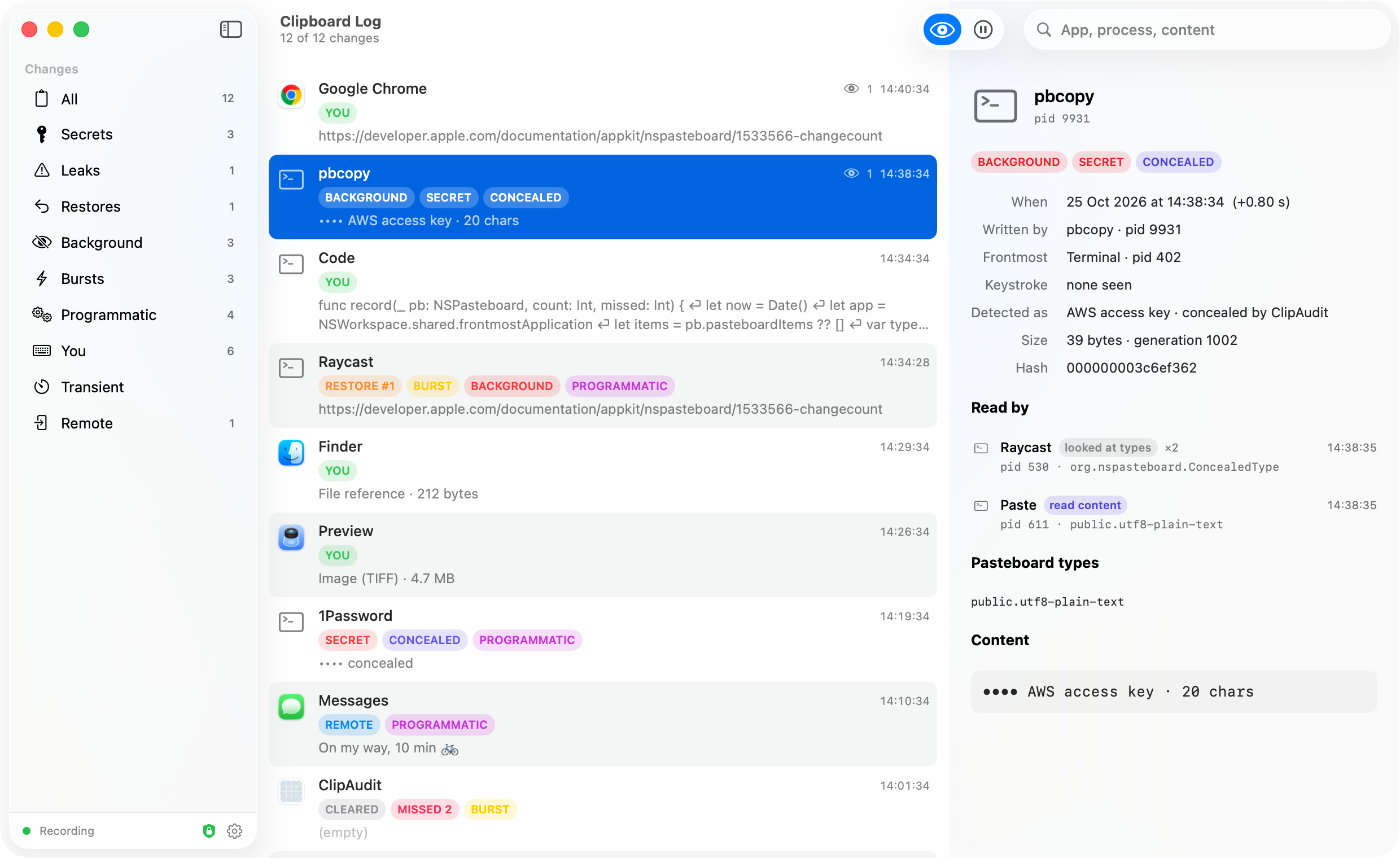
ClipAudit's log window: a list of clipboard changes with the writing process, flags such as SECRET and CONCEALED, and an inspector showing who read each change.

Your clipboard has a history. Now you can read it.

Every copy, every paste, every background tool that quietly put something back. Named, timed, and explained.

Log window with the pbcopy entry selected and the inspector open.

Exact attribution, not a guess

macOS has no public API for "who wrote the clipboard". ClipAudit reads the one place that knows: the pasteboard daemon's own log. Each change shows the process and pid that wrote it, and the inspector lists every process that read it afterwards, with what they read.
  • BACKGROUND: written while you were in a different app
  • RESTORE #n: old content put back by a tool
  • BURST, MISSED, REMOTE (from your iPhone), YOU (your own ⌘C)
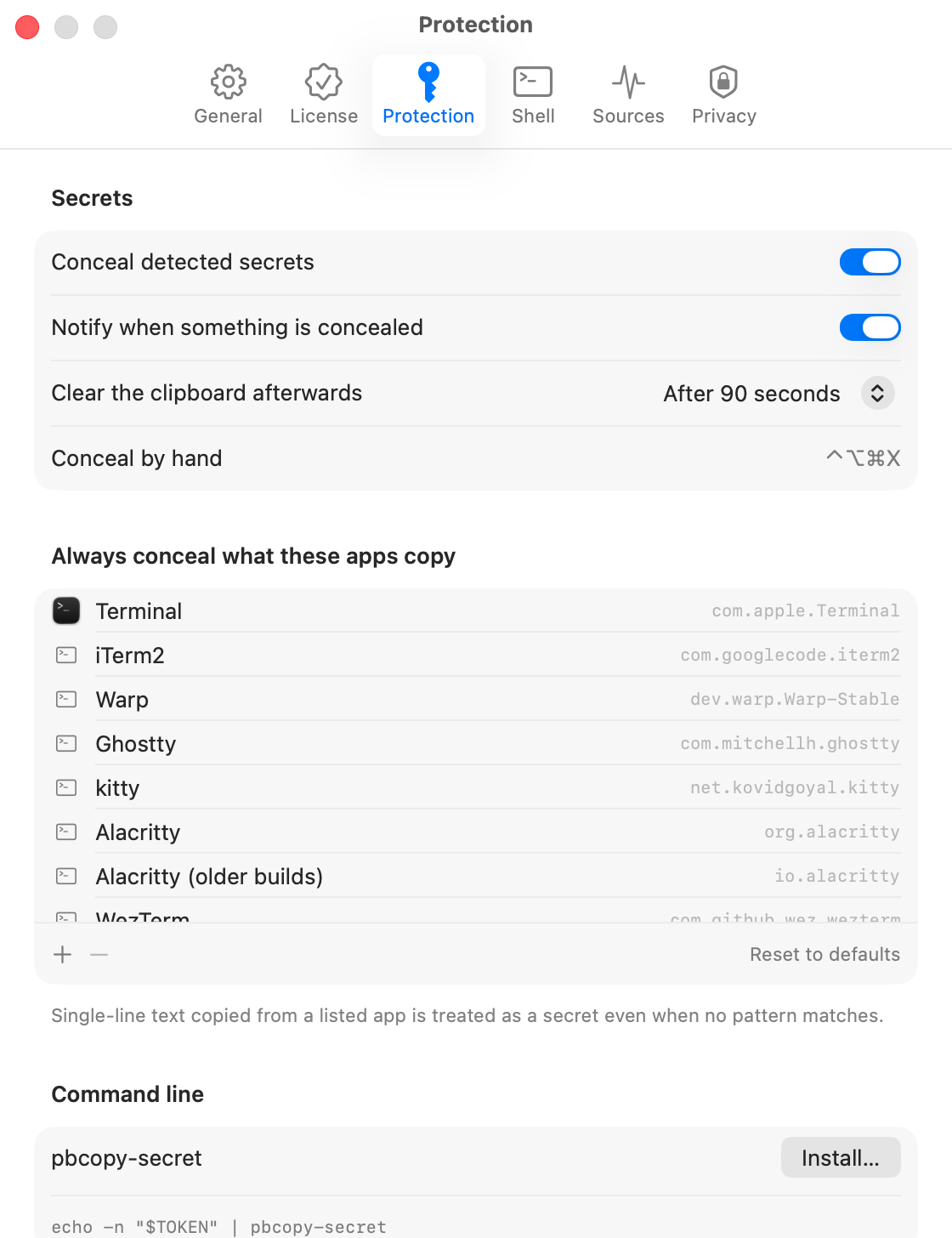
Protection settings: conceal detected secrets, notify, auto-clear, and the list of apps whose copies are always concealed.

Secrets never reach your clipboard history

Copy an API key, a private key, a password, a database URL. ClipAudit recognizes it and rewrites the clipboard with the nspasteboard Concealed marker about 6 ms later, before clipboard managers such as Raycast, Alfred, Paste or Maccy poll it. A notification tells you it happened; the clipboard clears itself after 90 s.

  • ~50 patterns: AWS, GitHub, OpenAI, Anthropic, Stripe, Slack, JWTs, PEM keys, .env lines, and more
  • Everything copied from a terminal or password manager is treated as a secret; the app list is yours to edit
  • Leaks view names any tool that read a secret anyway
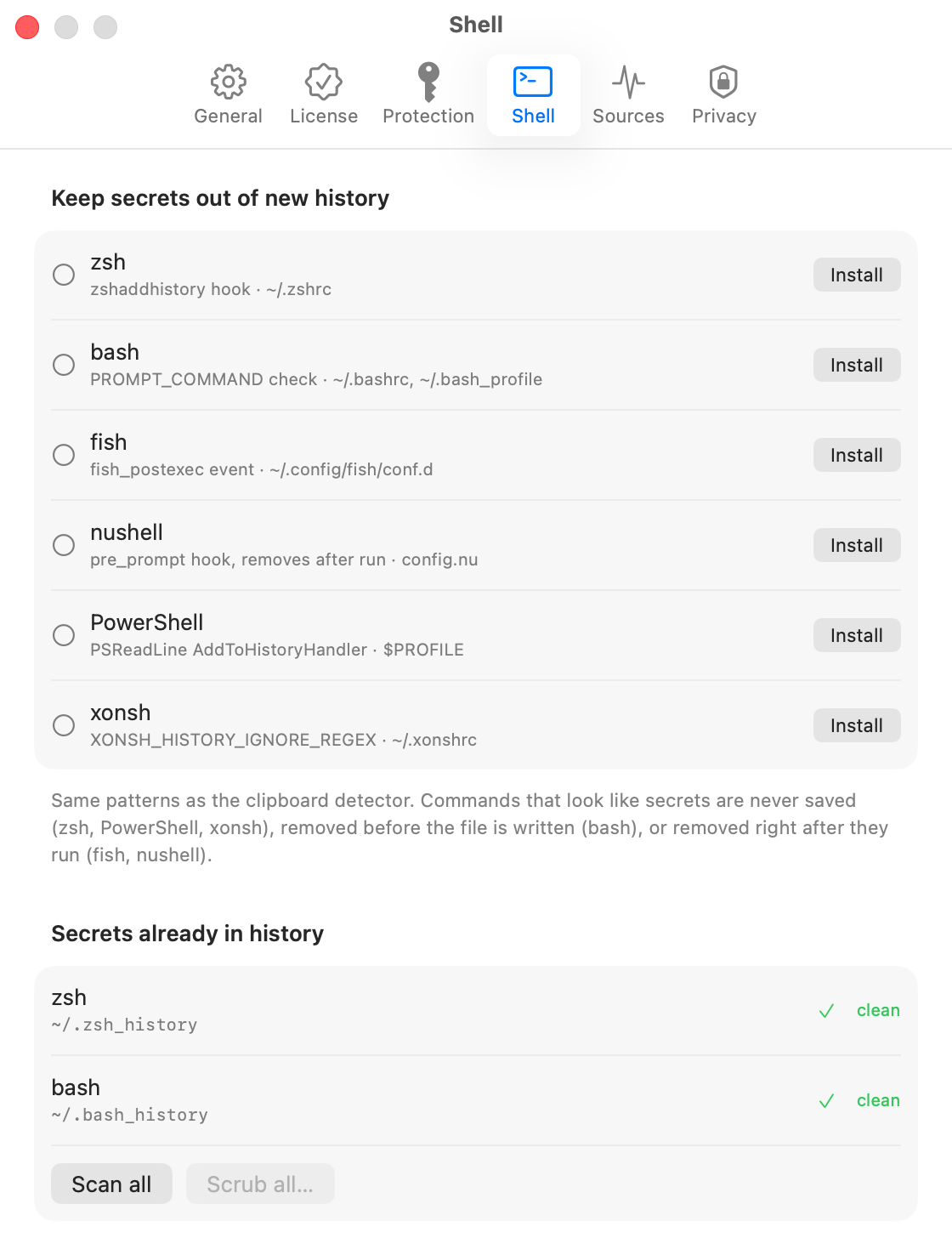
Shell settings: install hooks for zsh, bash, fish, nushell, PowerShell and xonsh, and scan history files for secrets.

Shell history, audited too

One click installs a hook for zsh, bash, fish, nushell, PowerShell or xonsh: commands that look like secrets are never saved. A scan finds what is already sitting in 19 history files, from ~/.zsh_history to .psql_history and .rediscli_history, and scrubs them with a backup.
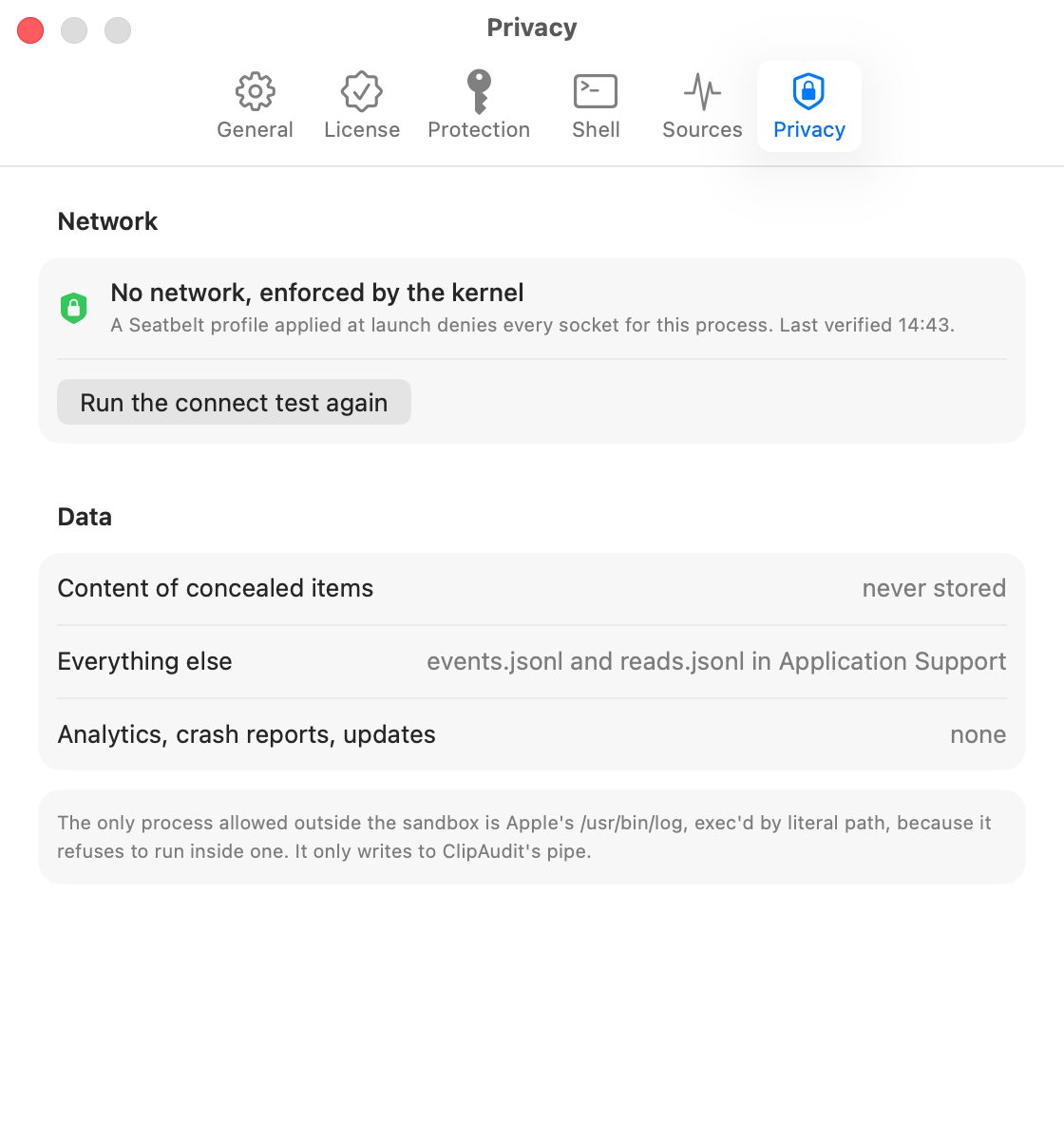
Privacy settings showing the kernel-enforced network lockdown and its live connection test.

It cannot phone home. The kernel makes sure.

On launch ClipAudit applies a Seatbelt profile to its own process that denies every socket. From then on connect() fails with EPERM no matter what code runs. The Privacy tab runs that connection attempt on demand so you can watch it fail.

  • No analytics, no crash reports, no update checks, no account
  • Two plain files in Application Support; delete them any time
  • The full source comes with your purchase, so you can check all of this yourself

Three ways to copy a secret safely

Automatic detection catches most. For the rest:

⌃⌥⌘X

Conceal now

A global hotkey (or the menu bar item) re-marks whatever is on the clipboard right now as concealed.

⇧⌘S

Copy as Secret

Select text in any app, choose Copy as Secret from the Services menu. The plain text never touches the clipboard.

$

pbcopy-secret

A drop-in for scripts: echo -n "$TOKEN" | pbcopy-secret. Installed from Settings in one click.

Built for people who read the source

$ ClipAudit --selftest PASS Private key (PEM) -----BEGIN OPENSSH PRIVATE KEY----- PASS AWS access key AKIAIOSFODNN7EXAMPLE PASS GitHub token ghp_16C7e42F292c6912E7710c838347Ae178B4a PASS OpenAI API key sk-proj-abcdefghijklmnopqrstuvwxyz0123456789ABCD PASS JWT eyJhbGciOiJIUzI1NiIsInR5cCI6IkpXVCJ9.eyJzdWIi… PASS Database URL postgres://app:S3cretPass[at]db.internal:5432/app PASS - See you at 3pm, bring the slides PASS - git commit -m "fix the sidebar" … 14 more fixtures 22/22 passed $ ./latency 30 # copy → concealed, measured at the daemon median 6.1 ms · p90 6.5 ms 30/30 concealed

Source code included

Every purchase comes with the complete Swift source under the MIT License: the detector and its fixture table, the daemon-log attribution, the Seatbelt lockdown, the shell hooks, the activation flow. Audit it, build it, change it.

Signed with our Apple Developer ID and notarized by Apple. Numbers above measured on an M-series Mac mini; the probe ships with the source. Exact process attribution is verified on macOS 26; on macOS 14 and 15 the app falls back to the frontmost app if the system log differs.

What gets flagged

The rule table, grouped. The shell hooks use the same table without the broad rules, so git commit hashes and checksums are left alone.

PEM / OpenSSH / PGP / PuTTY / age keysAWSGitHubGitLabOpenAIAnthropicGoogle API & OAuthGCP service accountsSlack tokens & webhooksStripeTwilioSendGridMailgunnpmPyPIHugging FaceDigitalOceanShopifyTelegram botsDiscordVercelCloudflareLinearNotionSupabaseDopplerPostmanDatabricksSquareMapboxDropboxFacebookAzureEthereum / Bitcoin / xprvJWTDatabase URLs with passwordsAuthorization headers.env assignmentspassword: linescurl -usshpassPGPASSWORD / MYSQL_PWDredis AUTHSQL IDENTIFIED BYhigh-entropy tokens

Lives in the menu bar

The last few changes, pause, conceal-now and the log are one click away. The log window is ⌘O.
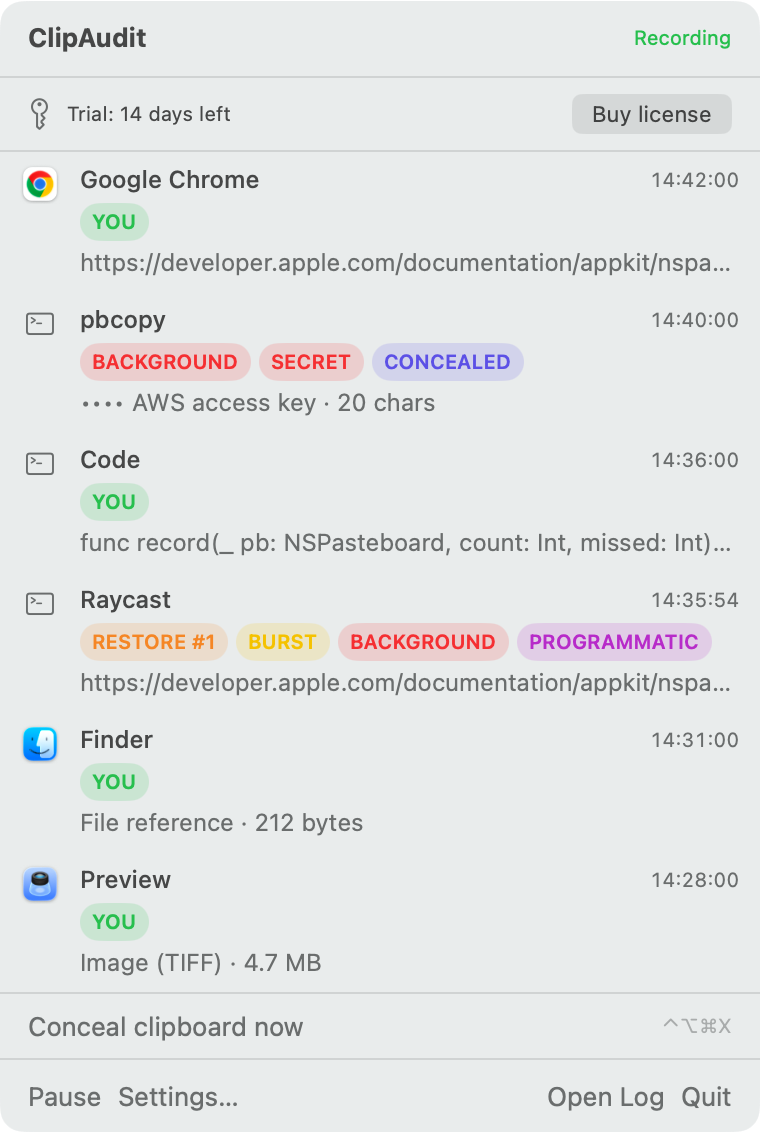
The ClipAudit menu bar popover listing the last changes with their flags.

Use ClipAudit today

14 days free with everything on. Then $29 per Mac, once. Includes a year of updates and the source code.

Download for macOS   Pricing

v0.6.0 · macOS 14+ · Developer ID signed, notarized · FAQs